Stop losing track of print jobs, artwork revisions, and customer approvals.
From artwork submission to customer approval and production, keep every print job organized in one workspace. Built for 1–15 person custom print shops that never want to reprint an order from the wrong file again.
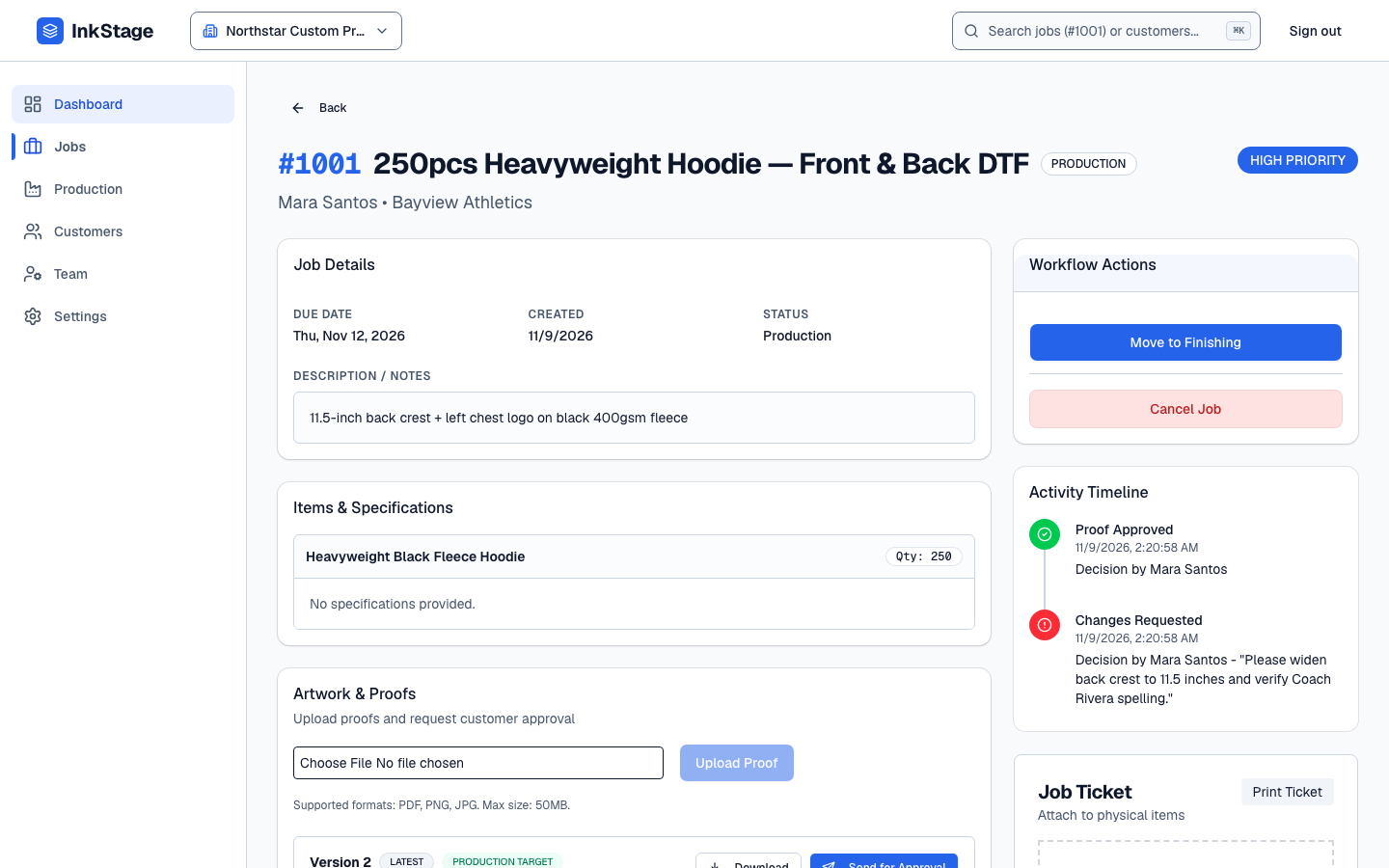
Customer Note: “Please widen back crest to 11.5 inches and fix spelling on Coach Rivera.”
Why Small Print Shops Lose Margin
One misread chat thread or wrong PDF costs an entire press run.
When job intake, proof revisions, and floor status are split across chat apps, folders, and whiteboards, mistakes slip directly onto garments, vinyl, and signage.
Proof. Approve. Produce.
How InkStage connects prepress, customer sign-off, and the shop floor
A clear six-step operational loop without bloated ERP setup or accounting complexity.
- Step 01
Create a job and add customer details
Select or add your customer, set due dates and priority, and capture structured print specifications under an automatic sequential Job #.
- Step 02
Upload artwork and create a proof
Attach PDF, PNG, JPG, or WebP proof files. InkStage numbers each upload sequentially (Version 1, Version 2…) and keeps sent versions immutable.
- Step 03
Send a secure approval link
Dispatch a private, 7-day expiring review link (/p/[token]) to your customer by email—with one-click revoke or reissue controls.
- Step 04
Customer approves or requests changes
Customers open the link on mobile or desktop without creating an account, enter their name, and record workflow approval or revision notes.
- Step 05
Start production using the exact approved proof
Starting production snapshots the approved proof version as your Production Target and blocks downstream stages if a version mismatch occurs.
- Step 06
Track finishing, readiness, and completion
Advance jobs across Approved, In Production, Finishing, and Ready, print scannable QR job tickets, and mark completed orders done.
Focused Print-Shop Capabilities
Everything needed to control proofs and production—nothing fabricated
Every capability below is live and enforced at the database level today, keeping multi-person shops aligned from artwork upload to pickup readiness.
Inside the Workspace
See the actual InkStage interface before you sign up
Explore sanitized screenshots from a live InkStage workspace—from versioned proof tracking and mobile customer review to the 4-stage Production Board.
Every artwork revision, customer note, and approval state on one job record
Upload sequential proof versions (Version 1, Version 2…), send expiring review links, and see immediately which version is approved as the Production Target.
- Sequential immutable proof versions prevent overwriting earlier files
- Customer change-request notes stay attached to the exact proof version
- Revoke or reissue expired approval links in one click
Built for 1–15 Employee Custom Shops
Tailored to custom print, apparel, signage, and personalization workflows
Whether you run a single DTF shaker, a 6-head manual press, or wide-format eco-solvent printers, InkStage fits any custom job that requires customer artwork sign-off before production.
DTF & Apparel Printing
Gang sheets, placement mockups, size breakdowns, and heat-press handoffs.
Screen Printing
Multi-color separations, Pantone callouts, and version-locked press runs.
Sublimation
Full-sublimation team jerseys, lanyards, and roster name/number checks.
Stickers & Labels
Die-cut contour lines, laminate finishes, and roll/sheet quantity tracking.
Tarpaulin & Large-Format
Exact width x height dimensions, eyelet instructions, and spelling sign-off.
Signage & Acrylic
Channel letters, Sintra boards, mounting specs, and installation readiness.
Invitations & Print Collateral
Multi-round typography revisions, paper stock notes, and final print approval.
Personalized Merchandise
Corporate giveaways, mugs, tumblers, and custom corporate gift batches.
Laser Engraving & Customization
Engraving vector placement proofs on wood, metal, leather, and plaques.
Start free today. Scale by concurrent active jobs—never per-month order penalties.
Job limits measure active jobs at a time. Once an order is marked Completed or Cancelled, it immediately frees up capacity for your next customer job.
Practical Answers
Frequently Asked Questions
Straight answers about how InkStage works in real print-shop operations today.
Does my customer need an account to approve a proof?
No. Customers open a secure, expiring capability link (/p/[token]) sent to their email and can view the proof file, approve it, or request changes by entering their name—no password, registration, or app install required.
Can customers approve artwork on mobile?
Yes. The public proof review page is built mobile-first with large touch targets so customers can open the artwork document, review job and version details, and submit workflow approval or revision notes from any smartphone browser.
Can I track multiple artwork revisions on the same job?
Yes. Every artwork upload creates a sequential, immutable proof version (Version 1, Version 2, Version 3…) with its own approval request history and customer feedback notes. Sent versions cannot be overwritten.
How does InkStage prevent production from using an outdated proof?
InkStage enforces production safety in the database: a job cannot enter production until a proof version is explicitly approved, starting production snapshots that exact approved proof version as the Production Target, and any mid-production reapproval or version mismatch blocks advancing to Finishing until reconciled.
Is customer proof approval a legally binding e-signature?
InkStage records a timestamped operational workflow approval (including the submitted name, proof version, and decision history) to align your shop and customer before printing. It is designed as a print-workflow record rather than a statutory digital signature certificate.
Can I export my organization data?
Yes. Organization Owners retain ownership of their shop data and can request a governed tenant archive export (including customer records, jobs, proof metadata, and stored proof files) through InkStage Support.
Can I manage multiple team members and what counts toward Active Jobs?
Workspaces support Owner, Manager, and Staff roles subject to your plan seat allowance (additional seats are currently provisioned via Support while self-serve invite controls are finalized). Active job limits measure concurrent open jobs—Completed and Cancelled jobs never count toward your limit.
Proof. Approve. Produce.
Keep every print job, proof version, and production handoff in one place.
Create your free InkStage print shop workspace in under a minute—up to 10 concurrent active jobs included with no credit card required.